












Product Details
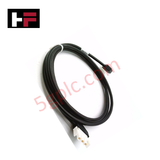
The ABB NKTU01-L8, also cataloged as the NKTU01-L8 Shielded Communication Cable, operates as a dedicated hardware component for noise-resistant signal transmission between I/O modules and termination units within ABB Symphony Harmony INFI 90 platforms. The 8-foot shielded cable routes digital and low-voltage control signals directly across internal cabinet layouts, suppressing electromagnetic interference (EMI) and maintaining physical link integrity without signal degradation.
Hardware Specifications
| Parameter | Specification |
|---|---|
| Model | NKTU01-L8 |
| Brand | ABB |
| Cable Type | Shielded Communication Cable |
| Length | 8 ft (2.44 m) |
| Interface | Pre-terminated connectors |
| Function | Connects I/O module to termination unit |
| System Compatibility | ABB Symphony Harmony INFI 90 control systems |
| Shielding | EMI-resistant overall shielding |
| Operating Temp | -40 deg C to +70 deg C |
| Power Consumption | Passive physical connection (24 VDC nominal signal rating) |
| Dimensions | Cable length 2.44 m (8 ft) |
| Weight | Approx 0.9 kg |
| Origin | Sweden |
Deterministic Network Routing & Communication Integrity
The ABB NKTU01-L8 cable architecture maintains deterministic network routing across Symphony Harmony INFI 90 cabinet backplanes. The integrated foil and braided shielding suppress external high-frequency noise and channel-to-channel cross-talk, preserving communication velocity between active I/O cards and field termination assemblies. Onboard firmware flash compatibility within connected modules ensures seamless network initialization without data frame corruption or transmission retries during execution cycles.
Frequently Asked Questions
Q: What is the recommended minimum bend radius when installing the NKTU01-L8 cable inside compact control cabinets?
A: Maintain a minimum static bend radius of 10 times the outer cable diameter to avoid damaging the internal foil shield and twisted conductor geometry.
Q: Can the pre-terminated connectors of the NKTU01-L8 be connected or disconnected while the system is powered?
A: No. Signal cables connected to Symphony Harmony INFI 90 termination units should be handled only when the respective I/O rack power is isolated to prevent accidental ground loops or module reset states.
Q: How is the cable shield terminated to handle electromagnetic interference (EMI)?
A: The outer shield terminates directly to the metallic shell of the pre-terminated connectors, establishing a low-impedance ground path to the module housing upon seating.
Field Installation Guidelines
Follow standard industrial installation steps when deploying the communication cable:
- System Power Isolation: De-energize the host I/O rack and termination assembly power supplies before inserting or removing the cable connectors.
- Route Isolation: Run the NKTU01-L8 through designated low-voltage control wireways. Maintain at least 300 mm separation from 480 VAC power lines and VFD output cabling to minimize EMI coupling.
- Connector Engagement: Align the pre-terminated connector pins with the module socket. Push straight in until the locking clips engage securely.
- Strain Relief Application: Secure the cable jacket to enclosure mounting rails using industrial cable ties within 100 mm of the connector body to reduce mechanical stress.
Additional Information
- 100% Genuine Parts: All products are original and authentic, ensuring reliable industrial performance.
- 30-Day Refund Guarantee: Return any in-stock item within 30 days in original, unopened packaging for a full refund (excluding shipping and fees).
- 12-Month Warranty: Covers defects in materials or workmanship; excludes misuse, normal wear, or unauthorized modifications.
- Worldwide Shipping: We ship via USPS, UPS, FedEx, and DHL. Delivery times vary by country and may be subject to customs or import fees.
- Support & Contact: Technical and warranty assistance is available anytime. Contact us here: Contact.
- Purchase Guidance: Check product specifications and compatibility carefully before ordering to ensure proper application.






Tech & Buying Guide

Demystifying the DDE Protocol in Legacy Industrial Automation Systems
Modern control systems rely heavily on seamless interprocess communication to exchange operational data between software programs. Microsoft first introduced the Dynamic Data Exchange (DDE) protocol in 1987 to enable real-time data sharing. In factory automation, DDE served as an early bridge between control software and Windows desktop applications. Therefore, understanding DDE mechanics provides crucial insights into how legacy industrial networks established software-level connectivity.

Demystifying CPU Communication Ports in Siemens PLC Architectures
Industrial automation relies heavily on robust data exchange between devices. Without seamless connectivity, field instruments, network switches, human-machine interfaces, and programmable logic controllers cannot coordinate effectively. Therefore, understanding the various CPU communication ports available in Siemens hardware ensures efficient factory automation design and seamless system integration.

Mastering the Siemens PLC Scan Cycle: How the CPU Executes Automation Programs
Industrial automation relies heavily on programmable logic controllers (PLCs) to manage complex manufacturing processes. Many engineers dive straight into programming without mastering the underlying architecture. However, understanding how a PLC CPU executes a program ensures reliable system design. Therefore, mastering the scan cycle optimizes both performance and troubleshooting in modern control systems.