













Product Details
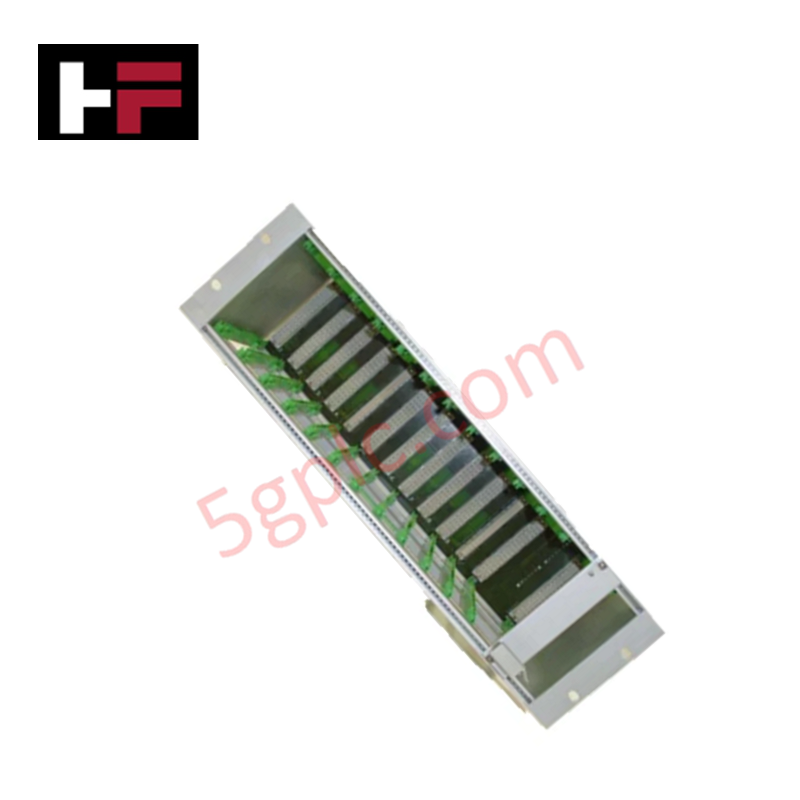
The Emerson IMR6000/10, also cataloged as the IMR6000/10 Machine Monitoring Systems Racks, operates as a dedicated hardware component for mechanical housing, backplane power distribution, and signal routing within MMS6000 Machine Protection System platforms. The 19-inch modular frame provides direct physical housing and electrical execution for up to 10 monitoring cards tracking vibration, speed, temperature, and shaft displacement.
Hardware Specifications
| Parameter | Specification |
|---|---|
| Model | IMR6000/10 |
| Brand | Emerson |
| Origin | Germany |
| Weight | 0.9 kg |
| Dimensions | Standard 19-inch rack enclosure envelope |
| Operating Temp | -10 to +60 deg C |
| Power Consumption | Internal backplane bus powered |
| Module Capacity | Up to 10 MMS6000 series monitoring cards |
| Series | EPRO MMS6000 |
| Communication Interface | RS-485 serial bus interface |
| Module Compatibility | MMS6140, A6312/08, and MMS6000 series modules |
| Product Type | Machine Monitoring Systems Racks |
4-20 mA HART Loop Protocol and Channel Isolation
The IMR6000/10 backplane architecture integrates internal channel-to-channel isolation paths across dedicated slot positions to prevent inter-module electrical interference and ground potential loops. When monitoring modules are interfaced with 4-20 mA HART loop protocol instruments and FOUNDATION Fieldbus segments, the rack backplane isolates field signals from shared RS-485 communication buses. Thermal reference planes embedded along the backplane sub-assembly preserve cold junction compensation accuracy for temperature-monitoring cards installed across all 10 card slots.
Frequently Asked Questions
Q: Does the IMR6000/10 rack support hot-swapping of individual MMS6000 monitoring cards during live operation?
A: Yes, card slots feature keying and bus-isolation traces that allow individual modules to be inserted or removed without powering down adjacent active channels in the rack.
Q: How is the RS-485 communication bus connected across the 10 module slots on the backplane?
A: The backplane incorporates a parallel multi-drop RS-485 trace topology that routes diagnostic communication sequentially to each slot while terminating at master bus terminals.
Q: What grounding configuration is required for the 19-inch IMR6000/10 chassis frame?
A: The chassis outer enclosure must be bonded directly to the main instrument ground grid via a low-impedance grounding strap attached to the rear chassis ground stud.
Field Installation Guidelines
- Mount the IMR6000/10 rack frame into a standard 19-inch instrument cabinet using four M6 mounting screws and washer assemblies.
- Verify cabinet earth bonding and connect the primary ground strap from the chassis grounding terminal to the cabinet earth bar.
- Check the internal backplane power supply rails for proper voltage levels before inserting MMS6000 series monitoring cards.
- Align card guide rails carefully and insert each monitoring module until rear backplane connectors seat fully.
- Tighten front panel captive thumbscrews on each installed card to ensure complete ground contact with the rack frame.
- Connect external RS-485 communication lines using shielded twisted-pair cabling, terminating line shields at a single ground point.
Additional Information
- 100% Genuine Parts: All products are original and authentic, ensuring reliable industrial performance.
- 30-Day Refund Guarantee: Return any in-stock item within 30 days in original, unopened packaging for a full refund (excluding shipping and fees).
- 12-Month Warranty: Covers defects in materials or workmanship; excludes misuse, normal wear, or unauthorized modifications.
- Worldwide Shipping: We ship via USPS, UPS, FedEx, and DHL. Delivery times vary by country and may be subject to customs or import fees.
- Support & Contact: Technical and warranty assistance is available anytime. Contact us here: Contact.
- Purchase Guidance: Check product specifications and compatibility carefully before ordering to ensure proper application.




Tech & Buying Guide
Comprehensive Guide to PLC Types in Modern Industrial Automation
Modern industrial automation relies on programmable logic controllers to govern critical factory operations. System integrators classify PLCs based on scale, hardware architecture, and power supply design. Understanding these core categories enables automation engineers to select the right control system architecture. Consequently, proper hardware selection optimizes performance while minimizing long-term operational costs.

Demystifying the DDE Protocol in Legacy Industrial Automation Systems
Modern control systems rely heavily on seamless interprocess communication to exchange operational data between software programs. Microsoft first introduced the Dynamic Data Exchange (DDE) protocol in 1987 to enable real-time data sharing. In factory automation, DDE served as an early bridge between control software and Windows desktop applications. Therefore, understanding DDE mechanics provides crucial insights into how legacy industrial networks established software-level connectivity.

Demystifying CPU Communication Ports in Siemens PLC Architectures
Industrial automation relies heavily on robust data exchange between devices. Without seamless connectivity, field instruments, network switches, human-machine interfaces, and programmable logic controllers cannot coordinate effectively. Therefore, understanding the various CPU communication ports available in Siemens hardware ensures efficient factory automation design and seamless system integration.