




Product Details
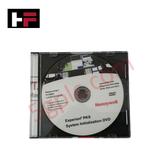
The Honeywell 51155281, also cataloged as the 51155281 Experion PKS System Initialization DVD, operates as a dedicated hardware component for software installation, node recovery, and system image deployment within Honeywell Experion PKS platforms.
Hardware Specifications
| Parameter | Specification |
|---|---|
| Model | 51155281 |
| Brand | Honeywell |
| Origin | USA |
| Weight | 0.1 kg |
| Dimensions | Standard optical media (120 mm) |
| Operating Temp | 0 to +50 deg C |
| Power Consumption | Passive optical storage media |
| Product Type | System Initialization DVD |
| Release Version | R124.1 / R400 / R410 |
| System Compatibility | Honeywell Experion PKS Server & Controller Nodes |
| Media Format | DVD-ROM |
Process Control and DCS Instrumentation Characteristics
The 51155281 initialization media delivers factory-validated system software images and drivers required for bootstrapping Experion PKS control nodes and engineering server platforms. Executing system initialization from this DVD establishes the baseline runtime environment needed to manage real-time 4-20 mA HART loop protocol telemetry, FOUNDATION Fieldbus field device integration, and Profibus PA segment communication. Loading certified baseline binaries ensures system-wide software compatibility across high-density I/O chassis, safeguarding channel-to-channel isolation parameters and ensuring accurate cold junction compensation (CJC) processing on connected analog temperature cards.
Frequently Asked Questions
Q: How is system initialization executed using the 51155281 DVD?
A: The DVD is booted directly from the host server or engineering workstation optical drive to execute bare-metal installation or full system image recovery via the Honeywell deployment wizard.
Q: Can initialization software from this DVD be installed on an active control server without taking it offline?
A: No. Initializing or re-imaging a control server requires taking the target node completely offline. Primary control must be transferred to a redundant server node before executing the installation.
Field Installation Guidelines
- Backup all active control strategy databases, system configuration files, and node licenses to external media prior to starting the software initialization.
- Insert the 51155281 DVD into the optical drive of the designated Honeywell server or workstation chassis.
- Boot the hardware into the optical drive media environment and verify file system checksums via the installation interface.
- Follow onscreen prompts to load the R124.1 / R400 / R410 baseline operating system components and core DCS drivers.
- Perform a full network communication audit post-installation to verify link stability across connected C300 controllers and field I/O racks.
Additional Information
- 100% Genuine Parts: All products are original and authentic, ensuring reliable industrial performance.
- 30-Day Refund Guarantee: Return any in-stock item within 30 days in original, unopened packaging for a full refund (excluding shipping and fees).
- 12-Month Warranty: Covers defects in materials or workmanship; excludes misuse, normal wear, or unauthorized modifications.
- Worldwide Shipping: We ship via USPS, UPS, FedEx, and DHL. Delivery times vary by country and may be subject to customs or import fees.
- Support & Contact: Technical and warranty assistance is available anytime. Contact us here: Contact.
- Purchase Guidance: Check product specifications and compatibility carefully before ordering to ensure proper application.








Tech & Buying Guide

Importance of Safety Barriers in PLC and DCS Control Systems

Static UPS vs. Rotary UPS: Technical Evaluation for Industrial Automation