

Product Details
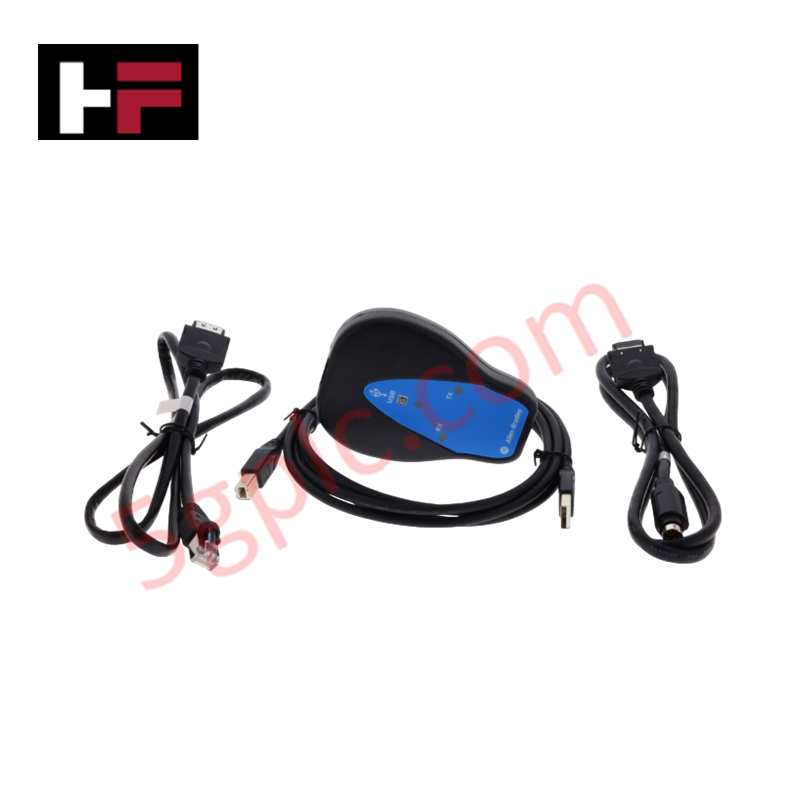
The ALLEN BRADLEY 1203-USB, also cataloged as the 1203-USB Converter, operates as a dedicated hardware component for protocol translation and data interfacing between personal computers and Allen Bradley drive platforms within industrial control networks.
Hardware Specifications
| Parameter | Specification |
|---|---|
| Model | 1203-USB |
| Brand | ALLEN BRADLEY |
| Origin | USA |
| Weight | 0.45 kg |
| Dimensions | Standard handheld interface module |
| Operating Temp | 0 deg C to 50 deg C |
| Power Consumption | Derived from connected drive |
| DPI Compatibility | PowerFlex 7/750 Series |
| DSI Compatibility | PowerFlex 4/520 Series, Kinetix 3 |
| SCANport | 1305, 1336 Legacy drives |
| Interface Ports | 1 Computer (USB), 1 Drive (DPI/DSI/SCANport) |
Industrial Control System Deterministic Network Communication
The 1203-USB converter facilitates direct parameter access and firmware management across diverse Allen Bradley hardware. It supports deterministic network configurations by enabling interface connectivity between host workstations and drives utilizing DPI, DSI, or legacy SCANport communication protocols. The module leverages internal nonvolatile memory for parameter storage, allowing for rapid deployment and backup of drive configurations without requiring external power sources during initial setup. Firmware flash compatibility is maintained through the host software interface, ensuring the converter remains operational across various drive series revisions.
Frequently Asked Questions
Q: Does the 1203-USB support hot-swapping between different drive communication ports?
A: The module can be connected to supported drives while the drive is powered; however, it is recommended to ensure the communication cable is fully seated to prevent intermittent data drops during parameter read/write cycles.
Q: How is the module powered during off-line configuration?
A: The device is designed to draw power from the connected drive port. If performing off-line configuration, an external power supply provided through the drive's communication interface is required to energize the module's circuitry.
Field Installation Guidelines
- Connection: Connect the USB cable to the host computer and the appropriate drive-specific cable to the drive interface port. Ensure the status indicators provide a solid connection signal before attempting data transmission.
- Grounding: To prevent electrostatic discharge (ESD) from damaging the drive’s communication port, ensure the host computer is at the same ground potential as the drive chassis, or use a USB isolator if common mode noise is present.
- Communication Settings: Configure the host software for the specific baud rate and protocol (DPI/DSI/SCANport) matching the target drive to ensure reliable handshake and data synchronization.
Additional Information
- 100% Genuine Parts: All products are original and authentic, ensuring reliable industrial performance.
- 30-Day Refund Guarantee: Return any in-stock item within 30 days in original, unopened packaging for a full refund (excluding shipping and fees).
- 12-Month Warranty: Covers defects in materials or workmanship; excludes misuse, normal wear, or unauthorized modifications.
- Worldwide Shipping: We ship via USPS, UPS, FedEx, and DHL. Delivery times vary by country and may be subject to customs or import fees.
- Support & Contact: Technical and warranty assistance is available anytime. Contact us here: Contact.
- Purchase Guidance: Check product specifications and compatibility carefully before ordering to ensure proper application.
Tech & Buying Guide
Demystifying the 5 Levels of Industrial Automation Architecture
Modern manufacturing relies on structured communication hierarchy to bridge physical shop-floor hardware with enterprise management software. This framework, commonly known as the Automation Pyramid, establishes how data flows between field devices, logic controllers, and corporate IT networks. Understanding these five distinct levels helps engineers and plant managers optimize system operations, reduce downtime, and implement seamless factory automation solutions.

Transforming Shop Floor Data into Actionable Insights: A Deep Dive into MES
Manufacturing Execution Systems serve as the digital backbone of modern factory floors. Positioned at Level 3 of the ISA-95 automation pyramid, MES links enterprise resource planning with real-time shop floor control systems. Today, industrial operators rely on MES software to bridge operational strategy with physical production execution.