














Product Details
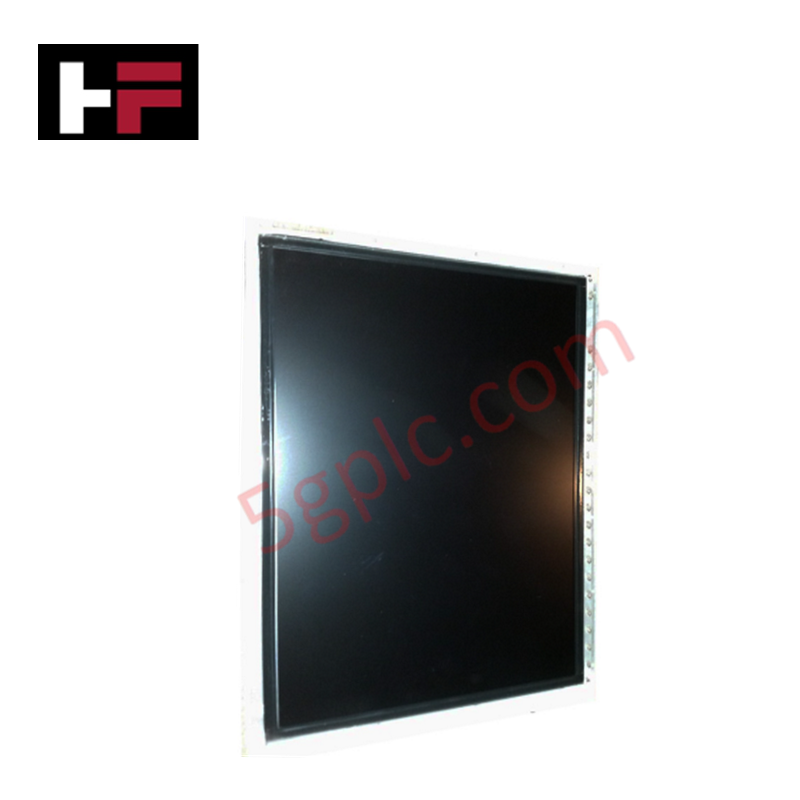
The Honeywell 51199194-100, also cataloged as the 51199194-100 Flat Panel Display, operates as a dedicated hardware component for high-resolution visual monitoring and operator entry execution within Honeywell Z-Console Universal Station architectures. It processes video and touch input signals across a 20.1-inch LCD panel driving 1600 x 1200 resolution for real-time process graphics displaying DCS plant data.
Hardware Specifications
| Parameter | Specification |
|---|---|
| Model | 51199194-100 |
| Brand | Honeywell |
| Origin | USA |
| Dimensions | 20.1-inch Diagonal Display |
| Operating Temp | 0 to 50 deg C |
| Power Consumption | 45 W Maximum (100-240 VAC, 50/60 Hz Input) |
| Display Resolution | 1600 x 1200 pixels (UXGA) |
| Aspect Ratio | 4:3 |
| Optical Specs | Brightness 250 cd/sq m, Contrast Ratio 1000:1 |
| Response Time | 16 ms (typical) |
| Viewing Angle | 170 deg Horizontal, 170 deg Vertical |
| Touchscreen Interface | Optional Resistive or Capacitive |
| System Compatibility | Honeywell Z-Console Universal Station |
FOUNDATION Fieldbus & HMI Signal Integration
The 51199194-100 display module renders high-density operator station schematics directly linked to process controllers tracking active FOUNDATION Fieldbus and Profibus PA segments. Internal shielding and industrial power supply filtering suppress high-frequency electrical noise and electro-magnetic interference originating from adjacent control room cabling. This ensures uncorrupted signal integrity across the video control board and prevents touch-controller drift or accidental activation during continuous industrial process monitoring.
Frequently Asked Questions
Q: Does replacing a legacy CRT monitor with the 51199194-100 require external AC-DC power converters?
A: No, the integrated power supply unit directly accepts universal line voltage ranging from 100 to 240 VAC at 50/60 Hz via standard internal power cabling.
Q: Can the 51199194-100 display be hot-swapped while the Z-Console operator station remains energized?
A: Video interface cable disengagement should occur only after isolating AC power to the display unit to avoid potential signal interface latch-up on the station controller board.
Field Installation Guidelines
- Isolate the AC main power feed before mounting the 20.1-inch flat panel into the Z-Console station cutout enclosure.
- Secure the display housing using specified mounting brackets, verifying metal-to-metal contact with the console frame for chassis grounding.
- Attach the video interface cable and optional touchscreen serial/USB controller cable, torquing thumb screws to prevent loose pin contact.
- Ensure adequate ventilation clearance around rear heat sinking vents to maintain internal operating temperatures within the 0 to 50 deg C range.
Additional Information
- 100% Genuine Parts: All products are original and authentic, ensuring reliable industrial performance.
- 30-Day Refund Guarantee: Return any in-stock item within 30 days in original, unopened packaging for a full refund (excluding shipping and fees).
- 12-Month Warranty: Covers defects in materials or workmanship; excludes misuse, normal wear, or unauthorized modifications.
- Worldwide Shipping: We ship via USPS, UPS, FedEx, and DHL. Delivery times vary by country and may be subject to customs or import fees.
- Support & Contact: Technical and warranty assistance is available anytime. Contact us here: Contact.
- Purchase Guidance: Check product specifications and compatibility carefully before ordering to ensure proper application.




Tech & Buying Guide

Marshalling Cabinet Preventive Maintenance: Essential Healthiness Checks for PLC, DCS, and ESD Systems
Marshalling cabinets serve as the vital interface between field instrumentation and control room electronics in modern process facilities. Regular preventive maintenance of these cabinets ensures signal integrity across programmable logic controllers (PLCs), distributed control systems (DCS), and emergency shutdown (ESD) networks. System technicians must execute structured inspection protocols to mitigate environmental risks, identify loose wiring, and maintain continuous operational readiness.

Spatial Computing in Industrial Automation: Elevating PLC and DCS Operations with AR and VR
Industry 4.0 integrates digital intelligence into field operations, transforming factory automation landscapes worldwide. Spatial technologies—specifically Augmented Reality (AR) and Virtual Reality (VR)—redefine how engineers interact with industrial control systems. By bridging computer-generated CAD models with real-time operational technology (OT) data, immersive displays enable intuitive monitoring, rapid diagnostics, and safer maintenance across complex processing facilities.

Master Acceptance Testing: Understanding FAT and SAT in Industrial Control Systems
Factory Acceptance Testing (FAT) and Site Acceptance Testing (SAT) serve as critical quality assurance gateways in complex industrial control systems. Both procedures verify that programmable logic controllers (PLCs), distributed control systems (DCS), and associated field devices meet strict functional specifications. However, executing these tests effectively requires clear delineation between off-site staging and final field commissioning.