












Product Details
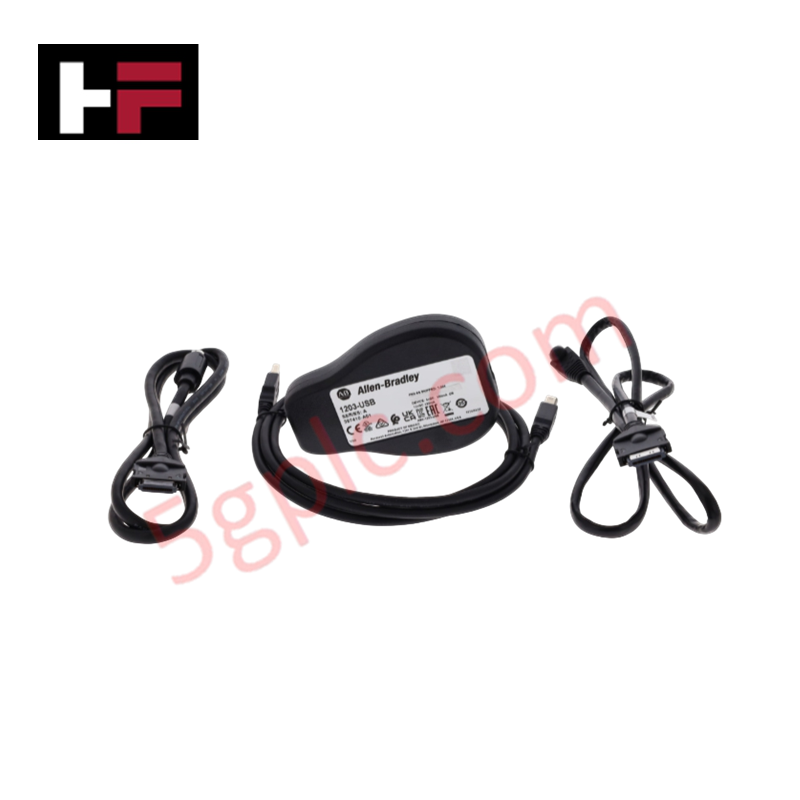
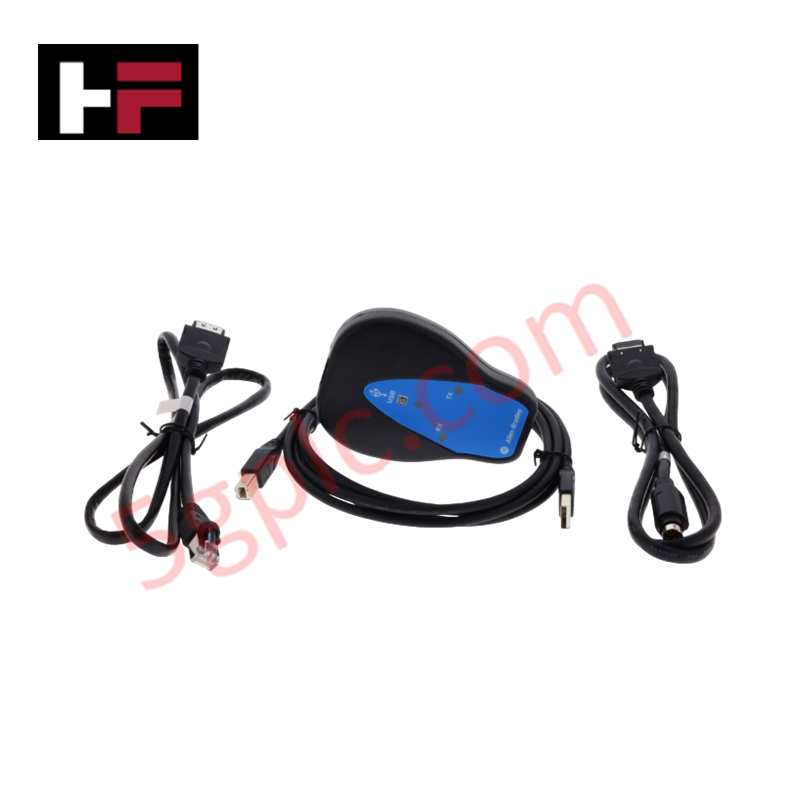
The ALLEN BRADLEY 1203-USB, also cataloged as the 1203-USB Converter, operates as a dedicated hardware component for protocol translation and data interfacing between personal computers and Allen Bradley drive platforms within industrial control networks.
Hardware Specifications
| Parameter | Specification |
|---|---|
| Model | 1203-USB |
| Brand | ALLEN BRADLEY |
| Origin | USA |
| Weight | 0.45 kg |
| Dimensions | Standard handheld interface module |
| Operating Temp | 0 deg C to 50 deg C |
| Power Consumption | Derived from connected drive |
| DPI Compatibility | PowerFlex 7/750 Series |
| DSI Compatibility | PowerFlex 4/520 Series, Kinetix 3 |
| SCANport | 1305, 1336 Legacy drives |
| Interface Ports | 1 Computer (USB), 1 Drive (DPI/DSI/SCANport) |
Industrial Control System Deterministic Network Communication
The 1203-USB converter facilitates direct parameter access and firmware management across diverse Allen Bradley hardware. It supports deterministic network configurations by enabling interface connectivity between host workstations and drives utilizing DPI, DSI, or legacy SCANport communication protocols. The module leverages internal nonvolatile memory for parameter storage, allowing for rapid deployment and backup of drive configurations without requiring external power sources during initial setup. Firmware flash compatibility is maintained through the host software interface, ensuring the converter remains operational across various drive series revisions.
Frequently Asked Questions
Q: Does the 1203-USB support hot-swapping between different drive communication ports?
A: The module can be connected to supported drives while the drive is powered; however, it is recommended to ensure the communication cable is fully seated to prevent intermittent data drops during parameter read/write cycles.
Q: How is the module powered during off-line configuration?
A: The device is designed to draw power from the connected drive port. If performing off-line configuration, an external power supply provided through the drive's communication interface is required to energize the module's circuitry.
Field Installation Guidelines
- Connection: Connect the USB cable to the host computer and the appropriate drive-specific cable to the drive interface port. Ensure the status indicators provide a solid connection signal before attempting data transmission.
- Grounding: To prevent electrostatic discharge (ESD) from damaging the drive’s communication port, ensure the host computer is at the same ground potential as the drive chassis, or use a USB isolator if common mode noise is present.
- Communication Settings: Configure the host software for the specific baud rate and protocol (DPI/DSI/SCANport) matching the target drive to ensure reliable handshake and data synchronization.
Additional Information
- 100% Genuine Parts: All products are original and authentic, ensuring reliable industrial performance.
- 30-Day Refund Guarantee: Return any in-stock item within 30 days in original, unopened packaging for a full refund (excluding shipping and fees).
- 12-Month Warranty: Covers defects in materials or workmanship; excludes misuse, normal wear, or unauthorized modifications.
- Worldwide Shipping: We ship via USPS, UPS, FedEx, and DHL. Delivery times vary by country and may be subject to customs or import fees.
- Support & Contact: Technical and warranty assistance is available anytime. Contact us here: Contact.
- Purchase Guidance: Check product specifications and compatibility carefully before ordering to ensure proper application.
Tech & Buying Guide

Understanding Root Causes of Unplanned PLC Stop Mode in Industrial Automation
Modern Programmable Logic Controllers manage execution through distinct operational states: Run, Stop, Start-Up, and Hold. During power-up, a controller initializes memory registers within Stop mode before briefly transitioning to Start-Up mode. During this phase, internal self-diagnostics evaluate system integrity across hardware and user programs. If the controller detects no critical faults, it enters Run mode to execute the control program continuously. However, any severe system anomaly forces the CPU back into Stop mode immediately to prevent erratic machine behavior across the plant floor.

Human-Machine Interface Design: Essential Guide to HMI Selection, Visualization, and Control System Integration
Human-Machine Interfaces (HMIs) serve as the primary operational window into complex industrial automation systems. Modern HMIs convert raw machine data into clear graphical displays, enabling operators to oversee entire manufacturing processes in real time. Instead of relying on physical control panels full of hardwired switches, engineers program interactive screens using intuitive graphics, dynamic color coding, and responsive touch interfaces. Over my 15 years in control systems engineering, I have observed HMIs transform from basic display screens into sophisticated command centers that drive operational efficiency across DCS and PLC environments.

Understanding Safety Relays in Industrial Automation: Architecture, Operation, and Functional Safety
Standard electromechanical relays provide basic electrical isolation between low-voltage control circuits and high-power output loads. A traditional switching relay features a magnetic coil driving mechanical Common (COM), Normally-Open (NO), and Normally-Closed (NC) contacts. However, standard relays pose severe functional risks when deployed in critical safety interlock circuits. High current inrush or mechanical wear can weld contacts together permanently. If contact welding occurs in an emergency stop circuit, pressing the button fails to halt hazardous machinery movements. Consequently, global functional safety standards prohibit standard relays for critical machine guarding functions.