












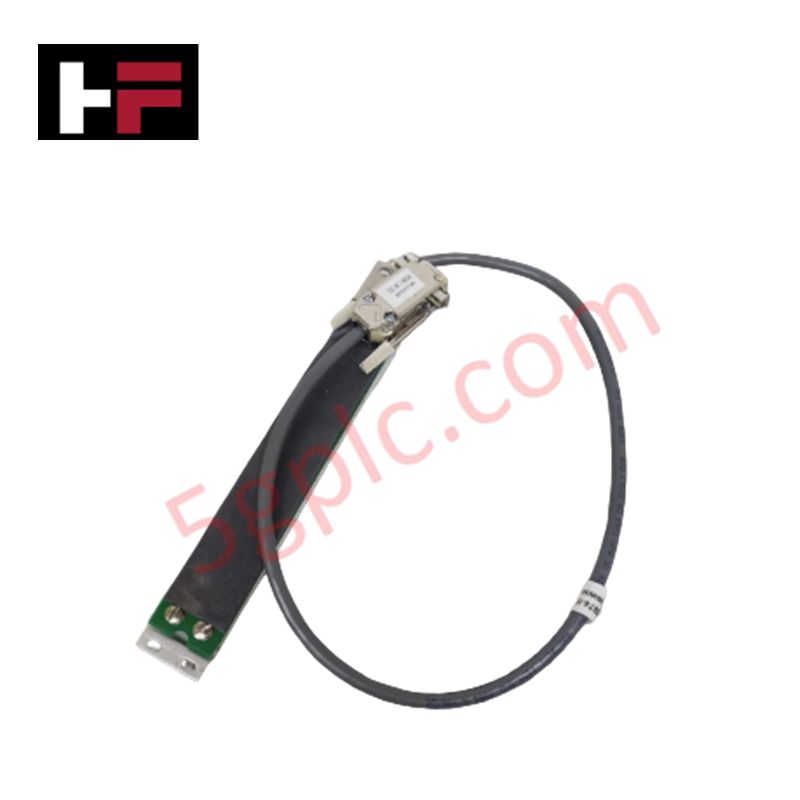


Product Details
Configured for signal transmission in TDC 3000 Distributed Control System (DCS) operator stations, the Honeywell 51308058-100 (51308058-100 Keyboard Interface Cable Assembly) provides direct physical and electrical execution of keyboard-to-console data communication.
Hardware Specifications
| Parameter | Specification |
|---|---|
| Model | 51308058-100 |
| Brand | Honeywell |
| Weight | 0.5 kg |
| Dimensions | 2-3 m length |
| Operating Temp | 0 to 55 deg C |
| Power Consumption | Not Applicable |
| Connector Type | Honeywell proprietary console |
| Cable Type | Keyboard interface |
DCS Process Control and Connectivity
The 51308058-100 utilizes industrial-grade electromagnetic interference (EMI) and radio frequency interference (RFI) shielding to maintain signal integrity during operator data entry. In DCS environments, high-frequency noise can introduce latency or character corruption in console communication loops. This assembly integrates channel-to-channel isolation principles for internal data lines, ensuring that the proprietary connector interface maintains a stable connection between the operator keyboard and the console electronics. The design minimizes signal degradation over the 2-3 m cable span, preventing common-mode noise propagation that could trigger diagnostic faults within the operator station interface.
Frequently Asked Questions
Q: Is this cable assembly compatible with non-Honeywell keyboard interfaces?
A: No. The 51308058-100 features a Honeywell proprietary console connector interface. It is strictly designed for use with TDC 3000 operator stations and cannot be adapted for standard USB or PS/2 interfaces without custom hardware conversion.
Q: How should the cable be routed to maintain EMI/RFI shielding effectiveness?
A: The cable should be routed through dedicated conduit or cable trays, physically separated from high-voltage power lines and large electromagnetic sources (such as variable frequency drives or heavy motors) to avoid inductive interference.
Field Installation Guidelines
- Ensure the operator station power is stable and the console is in a safe state before connecting or disconnecting the interface cable.
- Align the proprietary connector housing with the console receptacle, ensuring proper key orientation before applying pressure.
- Fully seat the connector until the locking mechanism engages, preventing intermittent connections caused by operator movement.
- Verify cable strain relief by ensuring that no excessive tension is placed on the connectors, which could lead to pin fatigue or mechanical failure.
- Perform a test input sequence at the operator console to confirm that all keystroke signals are correctly registered by the TDC 3000 system.
Additional Information
- 100% Genuine Parts: All products are original and authentic, ensuring reliable industrial performance.
- 30-Day Refund Guarantee: Return any in-stock item within 30 days in original, unopened packaging for a full refund (excluding shipping and fees).
- 12-Month Warranty: Covers defects in materials or workmanship; excludes misuse, normal wear, or unauthorized modifications.
- Worldwide Shipping: We ship via USPS, UPS, FedEx, and DHL. Delivery times vary by country and may be subject to customs or import fees.
- Support & Contact: Technical and warranty assistance is available anytime. Contact us here: Contact.
- Purchase Guidance: Check product specifications and compatibility carefully before ordering to ensure proper application.



Tech & Buying Guide

Transforming Shop Floor Data into Actionable Insights: A Deep Dive into MES
Manufacturing Execution Systems serve as the digital backbone of modern factory floors. Positioned at Level 3 of the ISA-95 automation pyramid, MES links enterprise resource planning with real-time shop floor control systems. Today, industrial operators rely on MES software to bridge operational strategy with physical production execution.

Managed Switch vs. Unmanaged Switch: Industrial Ethernet Architecture

Hot Standby vs. Cold Standby Redundancy in Industrial Automation
System availability determines process safety and productivity in industrial automation. Control engineers deploy redundancy to eliminate single points of failure. This technical guide evaluates Hot Standby vs. Cold Standby architectures, comparing failover speeds, memory sync, cost trade-offs, and field selection criteria.